How Appointment Reminder Planner works
SO CART SH.P.K.
Android
What it does
Calm Appointment is an offline appointment planner for saving appointments, viewing upcoming events on a calendar and agenda, and receiving local reminders before each appointment. It is aimed at simple, focused scheduling rather than a full calendar platform.
Who it is for: People who want a simple, offline way to save appointments, view them on a calendar, and get local reminders.
Key features
Date and time picker
Calendar and clock pickers with text-input alternatives for choosing date and time.
Create appointment
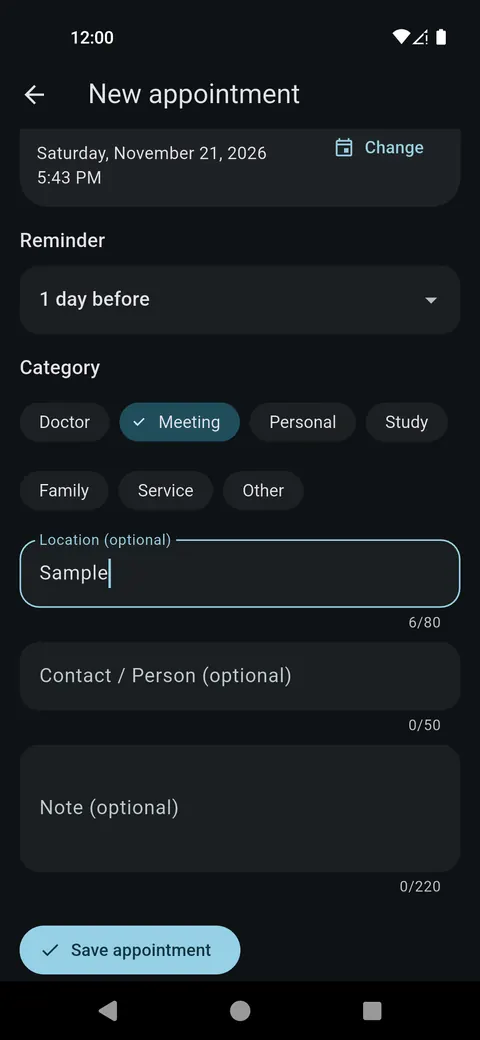
Form to add a new appointment with title, date, time, category and notes.
Reminder setting
Choose when to be reminded: none, at time, 10 min, 30 min, 1 hour or 1 day before.
Agenda calendar
Month calendar showing appointments per day with month navigation.
Appointment search
Search field to find appointments by text.
Appointments list
Scrollable list of all saved appointments.
The main user flow
- Add a new appointment: title, date and time, reminder, category, notes, then save
- Browse appointments by filter (Today, Upcoming, Completed, Missed) or search
- View the month agenda and pick a day to see its appointments
- Adjust theme and display preferences in Settings
- Navigation
- Bottom tab bar with four tabs: Today, Appointments, Agenda and Settings. Add and Quick add buttons open the new appointment form.
- Onboarding
- None seen in the captured screens; the app opens directly to the Today dashboard.
- How it makes money
- none seen
Screenshots
10 of 17 screens, captured on a real phone with sample data.
Today - at-a-glance dashboard All appointments list with filters Agenda - month calendar view Settings New appointment form Agenda year picker Appointments list with search text entered Theme mode chooser dialog New appointment form with reminder set New appointment form ready to save - +7 more screensFree with an account
Screenshots: © SO CART SH.P.K., shown for commentary.
See all 17 screens — create a free accountSee every screen
The full map has all 17 screens, every feature and where each one lives. It is free with an account.
What could be better
Our read of the map, the store listing and recent reviews.
Add a short first-run guide that explains adding an appointment and setting a remindersmall fix
The app opens straight to the Today dashboard with no onboarding; new users only get the empty-state message. Show a brief guide on first launch that walks through creating one appointment and choosing a reminder.
Let users jump to a far year or month in one tap in the date pickersmall fix
Moving years back or forward in the date picker needs many taps. Offer a year picker that opens directly from the header and lets users type a year, so distant appointment dates are reachable quickly.
Separate the search field from the filter chips on the appointments listsmall fix
Search and filter chips appear on the same screen and may feel cluttered. Put search behind its own icon or a separate view, and keep the chips for Today, Upcoming, Completed and Missed visible by default.
Add notification permission status and sound controls to Settingssmall fix
Settings has no visible way to manage notification permissions or sound, which matters because reminders depend on them. Show whether notifications are allowed and let users choose the reminder sound from Settings.
Apply the default reminder setting to new appointments from the create formsmall fix
Reminder defaults exist in Settings, but the create form asks for a reminder each time through a separate dialog. Pre-fill the form with the saved default and let users change it in one tap.
State the free, no-ads, no-purchase model and offline data handling in Aboutsmall fix
The app is free with no in-app purchases or ads, and works offline, but the About section only describes it as a focused planner. Add a plain statement of the pricing model and where appointment data is stored.
Want an app like this, but better?
Tell us the idea. We research it, and build it for you.
Submit your idea