
How IRI Road Roughness (RoadBump pro) works
DEFINITICS SOFTWARE SOLUTIONS PRIVATE LIMITED
Android
What it does
IRI Road Roughness turns a smartphone into a road-surface survey tool. It records riding quality along a route and maps it to IRI or PCI scores, with geo-tagged data, configurable condition thresholds and exports.
Who it is for: For people who survey road surface quality by recording rides along routes with a smartphone and reviewing IRI or PCI scores.
Key features
Language selection
Choose the app language from ten options.
Contact support
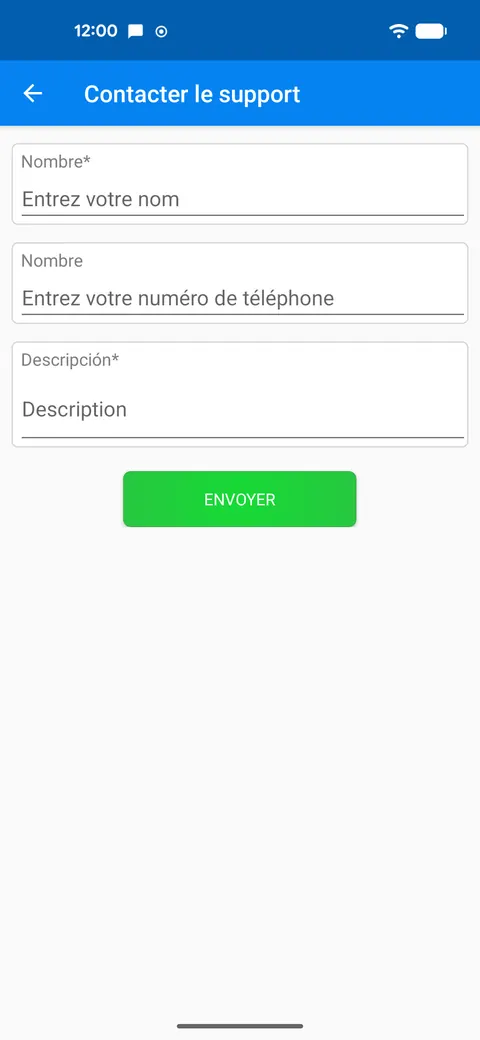
Form to submit a support issue with name, phone and description.
New ride
Starts a new road survey recording, after selecting a survey vehicle profile.
Saved rides
List of previously recorded rides; shows an empty state when none exist.
Survey vehicle profiles
Create a vehicle profile with a speed range used during surveys.
About us
Company info, website, business contact and app version.
The main user flow
- Create a survey vehicle profile with a speed range, then start a new ride
- Review saved rides (currently empty for the crawler)
- Subscribe to unlock PDF, CSV and KML export
- Contact support or read About Us
- Navigation
- Navigation drawer from the home screen holds New Ride, Saved Rides, Contact Support, About Us and Subscribe; Settings is reached from a top-bar icon.
- Onboarding
- No onboarding seen; the first-run prompt asks the user to create a survey vehicle profile.
- How it makes money
- Subscription paywall with weekly ($8.39, first week free) and monthly ($19.99, first month free) plans; PDF/CSV/KML export is premium. Drawer also promotes Pothole Guard.
Screenshots
10 of 22 screens, captured on a real phone with sample data.
Home - Spanish drawer Add vehicle - French Subscription paywall Settings Navigation drawer open Saved Rides - empty (French) Open-with chooser New Ride - vehicle dialog (Spanish) Home - navigation drawer Contact Support - French form - +12 more screensFree with an account
Screenshots: © DEFINITICS SOFTWARE SOLUTIONS PRIVATE LIMITED, shown for commentary.
See all 22 screens — create a free accountSee every screen
The full map has all 22 screens, every feature and where each one lives. It is free with an account.
What could be better
Our read of the map, the store listing and recent reviews.
Show accuracy method and calibration before the first survey ridemedium
Reviewers say readings do not match the ride. Today the vehicle profile only picks a speed band, and nothing explains how scores are derived. Show the method, calibration steps and the speed band limits before recording starts.
Fix mistranslated and placeholder strings, then test each language switchsmall fix
Strings are mixed across languages and some screens keep the old language after a switch. Audit all ten languages for placeholders and wrong labels, and test every switch path before shipping.
Add a short first-run guide before asking for a vehicle profilesmall fix
There is no onboarding, and the first prompt asks for a vehicle profile with no context. Show what a survey records, what the speed range is for, and how to start a first ride, then ask for the profile.
Explain why the support form needs a phone number, or make it optionalsmall fix
The support form requires a phone number with no explanation, which adds friction and can deter users. Label the field's purpose and mark it optional unless support needs it.
Offer a free CSV export and gate PDF and KML behind the subscriptionmedium
All export formats sit behind a paywall with trial plans. Offer CSV free for each ride and keep PDF and KML as premium, so users can test the data before subscribing.
Show the paywall after a completed ride, not only from the drawersmall fix
The paywall is reached from the drawer and export, with no link from a finished ride. Show the premium option on the ride result screen so users see it after a completed survey.
Remove the sister-app promotion from the main navigation drawersmall fix
The drawer promotes a separate app, which adds clutter next to core survey actions. Move the promotion to the About screen so the drawer lists only survey and support items.
Want an app like this, but better?
Tell us the idea. We research it, and build it for you.
Submit your idea