
How Hearing Test works
Marcin Masalski
Android
What it does
Hearing Test is a mobile audiology tool that runs pure-tone audiometry to find hearing thresholds per frequency and a digits-in-noise test to measure speech intelligibility. It supports headphone calibration and produces configurable audiogram and speech-chart results.
Who it is for: Hearing Test is a mobile audiology tool for pure-tone hearing threshold tests and digits-in-noise speech intelligibility tests.
Key features
Speech test settings
Configure language, number of triplets, scoring and chart overlays for the digits-in-noise test.
Headphone calibration
Uses manufacturer, Bluetooth or custom calibration coefficients, or a demo mode that skips calibration.
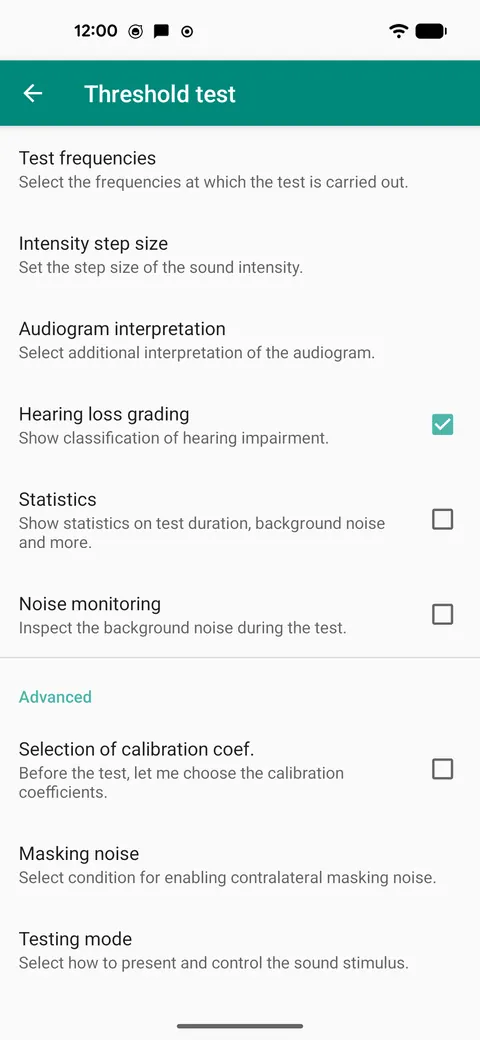
Threshold test settings
Configure frequencies, step size, masking, initial intensity and testing mode for pure-tone audiometry.
Digits-in-noise test
Assesses speech intelligibility by having the user recognise digit triplets in background noise, binaural or monaural.
Institution branding for printouts
Add institution name and logo to printed reports.
Pure-tone audiometry
Determines hearing threshold across frequencies by presenting tones and recording whether they are heard.
The main user flow
- Start a pure-tone threshold test: choose headphones and calibration, then tap I CAN HEAR / I CANNOT HEAR / BARELY AUDIBLE per ear
- Start a digits-in-noise test: choose binaural or monaural, then run the triplet test
- Adjust test settings for frequencies, step size, language, scoring and printing
- Browse previous tests and check the noise meter
- Navigation
- Home screen offers the two test types and history; a top-right More options menu gives noise meter, hide results and settings; settings split into threshold test, speech test, and data/printing/storage, with Navigate up buttons to return.
- Onboarding
- No dedicated onboarding seen; the user is shown headphone and calibration guidance and permission prompts when starting tests.
- How it makes money
- Pro version is referenced: manual stimulus mode, local database storage, offline testing and data transfer are labelled available in Pro version. No prices or paywall screen seen.
Screenshots
10 of 29 screens, captured on a real phone with sample data.
Home - test selection Threshold test - headphone setup Threshold test - ear selection and response Settings - main More options menu Testing mode dialog Microphone permission request Calibration coefficient source picker Digits-in-noise test type selection Settings - threshold test - +19 more screensFree with an account
Screenshots: © Marcin Masalski, shown for commentary.
See all 29 screens — create a free accountSee every screen
The full map has all 29 screens, every feature and where each one lives. It is free with an account.
What could be better
Our read of the map, the store listing and recent reviews.
Label every test-screen control and add step-by-step instructions before each testmedium
Test-screen buttons are mostly unlabelled with generic ids, and reviewers report missing or unclear controls. Show plain text on each button, a short how-to (hold or tap, when to press Barely Audible) and a visible next step before tones play.
Make calibration work offline and give a clear fallback for other headphonesmedium
Calibration depends on downloads and a server, and users hit connection errors and dead ends. Ship bundled coefficients, show a clear error with retry, and replace the normal-hearing-helper requirement with a self-check path for non-listed headphones.
Route tones to the selected ear and keep the other channel silentsmall fix
Users report static or tones moving between earphones and sound stopping on one side. Verify channel routing per ear before each test and show a check tone the user confirms on each side.
Ask for a safe listening level and never raise device volume without consentsmall fix
A reviewer reports the app raised phone volume to maximum without asking, and another reports a very loud tone. Before any tone, prompt the user to set a comfortable level and cap the volume the app can set.
Add a plain-language result summary and a referral note when results conflictmedium
Users see normal-hearing results despite known loss, get graphs they cannot read, and get no percentage or classification. Show a labelled verdict per ear, explain the audiogram, and advise seeing a clinician when results disagree with known symptoms.
Offer contralateral masking and a single-ear test that can be skippedmedium
Masking is only set by a condition dialog, and users cannot skip a dead ear, which skews the poorer-ear reading. Add a visible masking toggle and a per-ear skip option in the threshold flow.
Keep local history and backups working without a paid tiermedium
Users lose data on reinstall or device change and cannot back up results. Make export and backup reliable in the free tier, and state in the store listing which storage features are paid.
Want an app like this, but better?
Tell us the idea. We research it, and build it for you.
Submit your idea