How To Do Reminder with Alarm works
App Innovation
Android
What it does
To Do Reminder is a Productivity app that sets timed alarm reminders for tasks, meetings, bills, and routines, and tracks birthdays and anniversaries. It offers one-time and repeating reminders with snooze and full-screen alarms.
Who it is for: People who want timed alarm reminders for tasks, meetings, bills, routines, birthdays, and anniversaries.
Key features
Side navigation drawer
Main navigation menu for all sections.
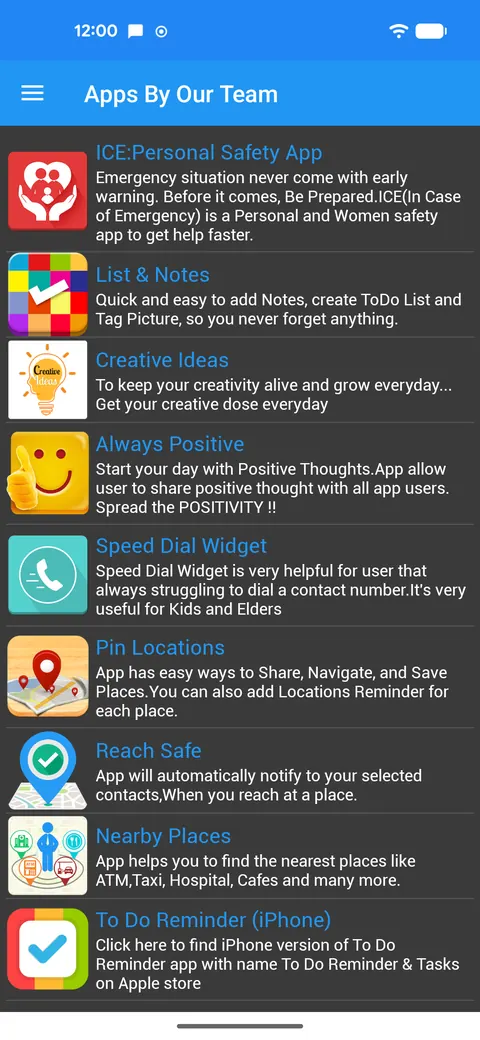
More apps promotion
Promotes other apps by the developer and third parties.
User guide (FAQ)
FAQ covering common questions and a video tutorial.
Special days
Track birthdays and anniversaries, with import from contacts or Google Calendar.
Send reminder to someone
Send a reminder to another person.
Video tutorial
Watch a video explaining how to use reminders.
The main user flow
- Add a one-time or repeating reminder from the task list
- Review and complete reminders and past history
- Add birthdays and anniversaries via contacts, Google Calendar or manual entry
- Send a reminder or wishes to someone else
- Back up and restore data
- Read the FAQ or watch the tutorial for troubleshooting
- Navigation
- A home task list with a side drawer providing access to all sections, plus a top-bar add button and completed-tasks shortcut.
- Onboarding
- No dedicated onboarding screens captured; the FAQ and a 'Reminder not working?' dialog serve as help.
- How it makes money
- Remove Ads option in the drawer, a Drma app install card, a CVwizard promotion, a shopping ad row, and a list of the developer's other apps.
Screenshots
10 of 28 screens, captured on a real phone with sample data.
Tasks - home Special Days - empty list User Guide (FAQ) Report Bug Settings Special Days add options menu Side drawer menu Need Help share sheet error Reminder not working? dialog Apps By Our Team - +18 more screensFree with an account
Screenshots: © App Innovation, shown for commentary.
See all 28 screens — create a free accountSee every screen
The full map has all 28 screens, every feature and where each one lives. It is free with an account.
What could be better
Our read of the map, the store listing and recent reviews.
Make alarms fire at the scheduled time and sound without a notification taplarge
Users report alarms that fire late, early, silently, or only after tapping the notification. Ship a reliable alarm path that sounds and shows full screen on schedule, and surface a clear fix when it cannot.
Stop duplicate and stalled repeat reminders with one clear series rulemedium
Repeating reminders fire twice, stop after a missed occurrence, or need re-setting daily. Schedule each repeat once, keep the series going after a miss, and offer 'this one' or 'all future' edits.
Restore backups made by the app itself, with a clear error when a file failsmedium
Users cannot restore their own backup files and are told the file is 'incompatible', losing reminders. Validate the format on export, accept it on import, and show the specific reason when restore fails.
Keep edit, complete and notes actions visible on each reminder rowsmall fix
Recent changes hid edit and complete behind the overflow menu and moved notes to the side. Show the primary actions directly on the row and keep a short one-tap view of attached notes.
Remove unrelated third-party promotions from content and send screenssmall fix
Shopping thumbnails, job-search cards and app install cards sit on FAQ and Send Reminder screens. Keep promotions off task and help screens, and offer ad removal as a clear one-time purchase with features that work afterward.
Give every help dead end a working fallback and an in-app contact pathsmall fix
Need Help opens a share sheet with no apps to handle it, and support emails go unanswered. Offer an in-app bug form with a status reply, and a fallback when no share targets exist.
Stop completed tasks from disappearing when an alarm is missedmedium
Tasks vanish from the list after an alarm goes off unread and move to history, so users miss them. Keep fired but unacknowledged reminders on the home list until the user marks them done.
Want an app like this, but better?
Tell us the idea. We research it, and build it for you.
Submit your idea