How Notepad - simple notes works
ATOMCZAK ARKADIUSZ TOMCZAK · Productivity
Android
What it does
Notepad is a simple, lightweight notes app for plain-text notes and checklists, with categories, sorting, multi-select, trash, and import/export of .txt files. It also offers backup to Google Drive and to a local file.
Who it is for: People who want a simple, lightweight notes app for plain-text notes and checklists, with backup and export options.
Key features
In-app ads
Third-party ads shown in the app's screens.
Notes list
Shows all notes with title and last-edit time.
Categories
Organise notes into user-defined categories.
Navigation drawer
Side menu for switching sections and settings.
Trash
Holds deleted notes.
Add category
Create a new category by name.
The main user flow
- Create a note or checklist from the notes list and edit it in the editor
- Organise notes into categories via the navigation drawer
- Select multiple notes to delete, export, categorize or colorize
- Back up or restore notes via Google Drive or a backup file
- Navigation
- A home notes list with a side navigation drawer for Notes, Categories, Backup, Trash, Settings and Help; an overflow menu on the list handles selection and import/export.
- Onboarding
- None seen in the captured screens.
- How it makes money
- Visible third-party ads on several screens (app install and dating-site ads), and a 'Turn off ads' option in the drawer, implying a paid ad-removal option.
Screenshots
10 of 32 screens, captured on a real phone with sample data.
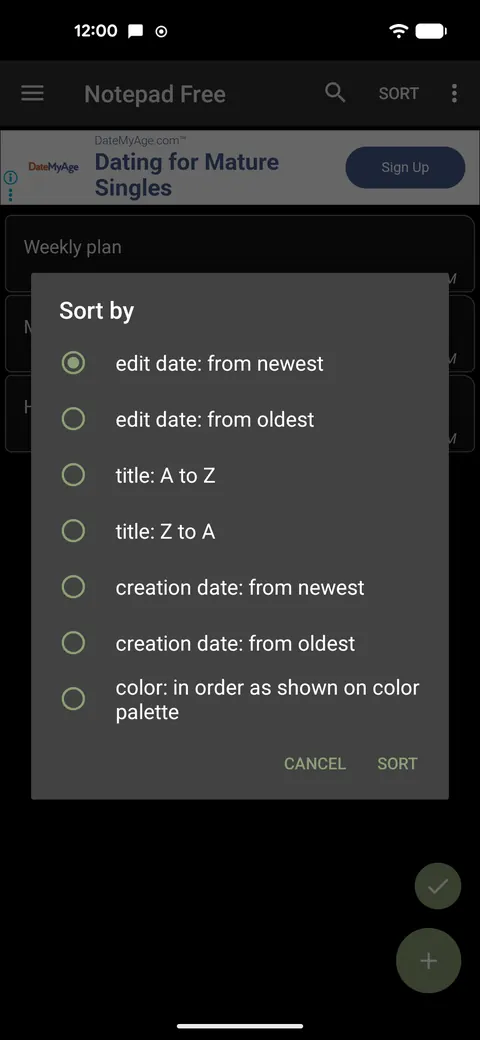
Home - notes list Selection mode (1 selected) with app ad Trash - note view Note editor Categories - add (with ad) Backup - online and file backup Selection menu - export and categorize Navigation drawer Help - instructions Sort dialog - +22 more screensFree with an account
Screenshots: © ATOMCZAK ARKADIUSZ TOMCZAK, shown for commentary.
See all 32 screens — create a free accountSee every screen
The full map has all 32 screens, every feature and where each one lives. It is free with an account.
What could be better
Our read of the map, the store listing and recent reviews.
Ship restorable backup and sync, and test restore before relying on itlarge
Users report notes lost after updates, phone changes or backups that do not restore, and cloud sync is still only planned. Ship working sync with a restore check and a clear restore path before the backup screen is offered as protection.
Autosave drafts so a crash or interruption does not discard typed textmedium
Text typed in the editor is lost when the app crashes or is interrupted before the user taps SAVE. Autosave the draft on each edit and restore it on relaunch, so saving is no longer a manual step the user can miss.
Offer a one-time ad-free purchase alongside the adssmall fix
The drawer has a Turn off ads entry, but users report no purchase option and an ad that does not load. Offer a one-time ad removal purchase with clear pricing, and do not tie removal to watching a video ad.
Keep ads off the note list during selection and out of full-screen pop-upssmall fix
Ads appear at the top of lists, over the drawer and during multi-select, and some are unrelated to notes. Limit ads to a fixed banner on the main list, and never show them during selection or as full-screen pop-ups.
Add bold, font size and colour options to the note editormedium
The editor offers plain text only, and users ask for bold and font changes. Add a formatting toolbar with bold, size and colour that works on selected text, and keep it optional so plain notes stay simple.
Fix text selection and paste in the editormedium
Users cannot select all text, cannot paste copied text, and report the editor getting stuck in highlight mode. Fix select-all, paste and text-selection handling in the editor, and test these paths before releasing edits.
Add a Restore action to Trash with a confirmation toggle for deletessmall fix
Trash shows no restore option in the captured screens, so deleted notes cannot be recovered in the app. Add a restore action on each trashed note and an option to turn off the delete confirmation prompt.
Want an app like this, but better?
Tell us the idea. We research it, and build it for you.
Submit your idea