How PDF Reader - PDF Editor works
ABISHKKING LIMITED · Productivity
Android
What it does
PDF Reader - PDF Editor scans the device for PDF and office documents and lists them so they can be opened, read and managed in one place. It is advertised with editing, highlighting, notes and e-signature features, though these are not visible in the captured screens.
Who it is for: People who want to find, open, read and manage PDF and office documents stored on their device in one place.
Key features
Feature request
Lets users suggest features, with preset options or a custom text entry.
FAQ help center
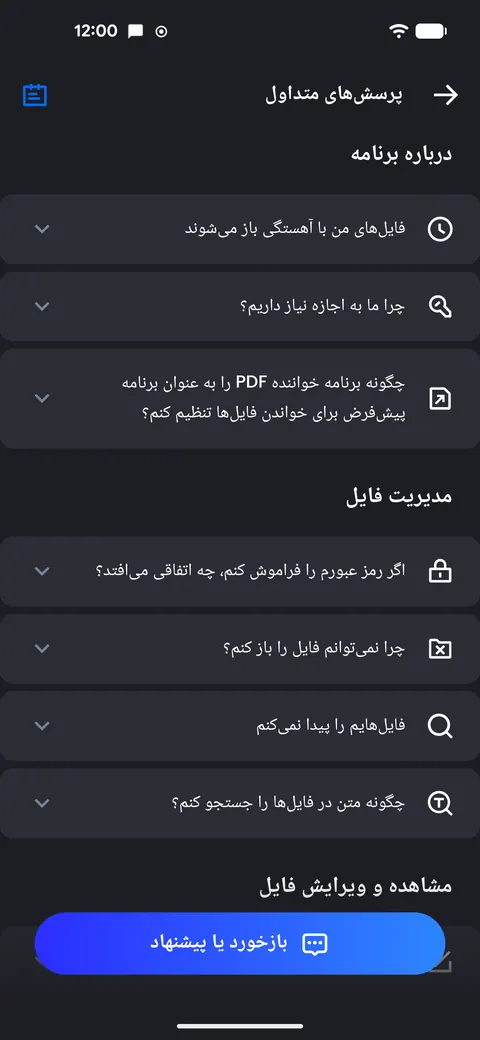
Searchable questions and answers about the app, files and editing, with helpfulness rating.
Feedback and bug report
Form to report problems by type with description and optional photo.
Camera permission
Requests camera access to photograph documents and convert them to PDF.
Document file list
Shows scanned PDF, Word, Excel, PPT and TXT files with date and size.
File type filter
Filter files by folder or format (PDF, DOC, PPT, Excel, TXT).
The main user flow
- Open the app and browse the scanned file list
- Search files by name and filter by format
- Read the FAQ and submit feedback or a feature request
- Subscribe to PRO from the drawer or paywall
- Navigation
- Home screen with a bottom tab bar (Home, Recent, Favorite, Tools) and a side navigation drawer for premium, import, FAQ, feedback and settings.
- Onboarding
- A notification permission prompt on launch, a banner asking for all-files access, and a camera permission rationale when attaching photos.
- How it makes money
- Visible PRO paywall with a 3-day free trial, $59.99/year (-58%) and $11.99/month plans, plus 'Remove all ads' and 'Unlock Premium' entries in the drawer.
Screenshots
10 of 34 screens, captured on a real phone with sample data.
Home - file list (right-to-left layout) FAQ - list of questions Feedback form - problem report File search Home - navigation drawer Feature request sheet (FAQ) Notification permission prompt Camera permission rationale Home - file list FAQ - list of questions (Persian) - +24 more screensFree with an account
Screenshots: © ABISHKKING LIMITED, shown for commentary.
See all 34 screens — create a free accountSee every screen
The full map has all 34 screens, every feature and where each one lives. It is free with an account.
What could be better
Our read of the map, the store listing and recent reviews.
Add a visible skip control to ads and never block the first file openmedium
Reviews say ads cannot be closed and block use, and the map shows ads on a basic reader. Show ads only between sessions, with a clear close button that does not open a link, and keep the first document open ad-free.
Replace the fake 'outdated app' prompt with a real store update checksmall fix
Users report an 'outdated' popup that sends them to a different install. Check the store version in the app and show an update link only when the app is truly old, without redirecting to another app.
Explain all-files access in the first session and keep the file list usable without itmedium
The file list depends on the all-files permission and the banner is easy to miss. Show a clear reason screen before the request, and let users open recent or picked files without the full-storage grant.
Put feedback and bug reporting on the main screen, not only in the drawer and FAQsmall fix
The feedback form is buried in the drawer and FAQ, so problem reports are hard to find. Add a Help or Report entry to the bottom tabs and link it from the error state of failed file opens.
Fix page editing, dark mode text and right-to-left documents before adding featureslarge
Reviews report night-mode text too light, horizontal pages failing, and page edits that cannot be done. The map shows editing is advertised but not visible. Test these flows before expanding feature claims.
Cut cold-start time by loading the file list before scanning device storagemedium
Users say the app takes too long to open. Show cached recent files immediately and run the full device scan in the background with a progress indicator.
Show a confirmation and status for each feature request submittedsmall fix
Feature requests have no visible confirmation of tracking. After submit, show a thank-you with a reference and a status list of requests so users know the request was recorded.
Want an app like this, but better?
Tell us the idea. We research it, and build it for you.
Submit your idea