How Morfo - Dental Anatomy 3D works
MEDEASOFT BILISIM TEKNOLOJILERI ANONIM SIRKETI · Education
Android
What it does
3D dental anatomy atlas: pick a tooth from the arch, rotate it, read dimensions and morphology per view, highlight structures, take a quiz. Free version unlocks only two permanent teeth, two primary teeth and one quiz.
Who it is for: Dental students and educators who want a 3D atlas of tooth anatomy with quizzes.
Key features
Named View Buttons
Morphology Text
3D Tooth Viewer
Drag To Rotate
Quiz
Quiz Feedback
The main user flow
- Arch to tooth to view buttons and text
- Swipe carousel: Permanent, Curves, Planes, Primary, Notation, Quiz
- Info to subscription
- Navigation
- Landscape-only Unity app. Horizontal swipes cycle sections around a ring (labelled by hand icons); tapping a tooth opens its viewer; back arrow returns.
- Onboarding
- None; opens directly on the arch (small letterboxed layout until the Android compat button is tapped).
- How it makes money
- Subscription 0.99 USD/month via Google Play (Full Access): all teeth, curves/planes, notation systems, quizzes. Locked items trigger the Play sheet on tap.
Screenshots
10 of 32 screens, captured on a real phone with sample data.
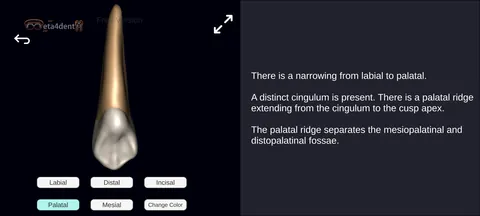
Permanent dentition arch (start screen) Quiz list Tooth 3D: upper central incisor, Dimensions Info: Full Version Subscription Language picker Primary teeth arch Labial view Distal view Incisal view Palatal view - +22 more screensFree with an account
Screenshots: © MEDEASOFT BILISIM TEKNOLOJILERI ANONIM SIRKETI, shown for commentary.
See all 32 screens — create a free accountSee every screen
The full map has all 32 screens, every feature and where each one lives. It is free with an account.
What could be better
Our read of the map, the store listing and recent reviews.
Let the app rotate with the device and fit portrait and landscape screensmedium
The app is landscape-only and letterboxed on first launch until a compat button is tapped. Support both orientations and size the arch to the real screen so the first view is not cropped.
Expose labels and controls to screen readersmedium
There is no accessibility tree, so the arch, carousel and view buttons cannot be read aloud. Add content descriptions and focus order for teeth, named view buttons and the Change Color toggle.
Show a free preview of locked teeth before the subscription sheetmedium
Free users see only two of 32 permanent teeth, and tapping any locked tooth jumps straight to the Google Play sheet. Let a locked tooth open a read-only summary or one sample view first, then offer the upgrade.
Explain each quiz answer and let wrong answers move the quiz forwardmedium
A wrong answer only turns red, gives no explanation and does not advance, so the learner is stuck on the question. Show the correct answer with a short reason and allow moving to the next question.
Add a visible hint for pinch zoom and drag rotation in the 3D viewersmall fix
Pinch zoom is not discoverable, and a vertical drag only appears to zoom out. Add a brief on-screen hint for zoom and a clear zoom control so users can find it without guessing.
Finish translating all labels and match the language picker to real supportmedium
Some labels are still in Turkish, and the language picker lists EN twice alongside TR, AR and RU. Ship complete translations for every language offered and remove the duplicate entry.
Add a one-screen first-run guide for the carousel and arch tapsmall fix
There is no onboarding, and the swipe sections are marked only by hand-icon hints. Show a short first-run guide that explains swiping between sections and tapping a tooth to open its viewer.
Want an app like this, but better?
Tell us the idea. We research it, and build it for you.
Submit your idea