
How SmartThings works
삼성전자(주)
Android
What it does
SmartThings is a smart home hub app for controlling Samsung Smart TVs, appliances and third-party devices from one place. It groups devices, supports automations via routines, and links external services and voice assistants.
Who it is for: A smart home app for people who want to control Samsung Smart TVs, appliances, and third-party devices from one place.
Key features
Permissions setup
Explains and requests optional permissions such as location, microphone and nearby devices.
Main settings
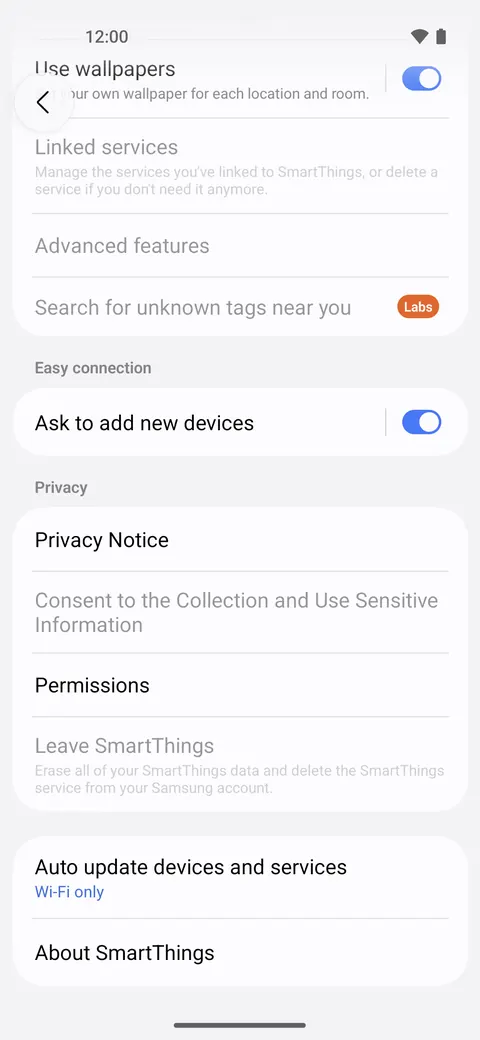
Central settings for notifications, wallpapers, labs and device prompts.
Add device
Adds new devices and lists supported devices.
Feature tour
Swipeable pages introducing new features, skippable.
Privacy and permissions
Privacy notice, sensitive data consent and permission management.
Automatic updates
Controls automatic device and service updates by network.
The main user flow
- Intro and feature tour, then optional permission grants
- Sign in, then add devices from the Devices tab or Add device action
- Create routines to automate devices
- Link services from the Life tab
- Adjust settings for notifications, wallpapers, updates and privacy
- Navigation
- Bottom tab bar with Home, Devices, Life, Routines and Menu, plus a settings page reached from Menu.
- Onboarding
- Three-step intro followed by a four-page feature tour and a location and optional permissions prompt, with Skip on tour pages.
- How it makes money
- none seen
Screenshots
10 of 24 screens, captured on a real phone with sample data.
Home - empty, signed out Life - services Settings - main What's new - customize Home tab Menu About SmartThings Devices - empty list Permissions list Start dialog - settings prompt Settings - scrolled - +14 more screensFree with an account
Screenshots: © 삼성전자(주), shown for commentary.
See all 24 screens — create a free accountSee every screen
The full map has all 24 screens, every feature and where each one lives. It is free with an account.
What could be better
Our read of the map, the store listing and recent reviews.
Let users see home status and controls before requiring a Samsung account sign-inlarge
Signed-out Home and Devices tabs push sign-in and adding a device before showing value, and reviews say sign-in loops block use. Show a read-only or limited view first and ask for sign-in only when syncing or linking services.
Show offline and disconnected devices with a clear status and one-tap reconnectlarge
Reviews say devices drop offline and must be re-added to work. Mark each device's connection state on the device list and offer an in-place reconnect instead of a full re-add flow.
Ship updates with an opt-in prompt and visible change notes, never silent setting changesmedium
Reviews report updates that changed settings or broke device control without notice. Before any update, show what changes and ask for approval, and keep previously disabled permissions off unless the user re-enables them.
Default feature suggestions and alerts to quiet, with one mute control for all soundssmall fix
Reviews complain about constant sounds and pushy prompts that cannot be muted. Set suggestions to off by default and add a single control that silences all app sounds and alerts.
Group settings into short, labelled sections with privacy and permissions near the topsmall fix
The settings list is long and dense, and the lower section is hard to scan. Group items by purpose, keep privacy and permissions in one visible section, and avoid long single-column lists.
Request each optional permission in context with full, untruncated reasonsmedium
Permissions are split across several screens and explanations are truncated, and reviews say precise location and consent were requested without clear need. Ask for each permission at the feature that needs it, with the full reason and a note on what still works without it.
Cut launch and command response times for device controlmedium
Reviews describe the app as very slow, with slow responses to commands and long waits on device setup. Measure cold start and command latency on low-end phones and set a budget to meet before shipping feature changes.
Want an app like this, but better?
Tell us the idea. We research it, and build it for you.
Submit your idea