
How TakeYourPills Pill Reminder works
Dimitar Konstantinov Zhivkov
Android
What it does
Take Your Pills is a medication reminder app that schedules doses, sends notification alerts and records intake history. Users add medications, manage profiles and review or export their history.
Who it is for: People who take medications and want dose reminders, intake history tracking, and profile management.
Key features
Third-party advertisements
Third-party ads for other apps are shown on several screens.
Add medication
Create a medication with a name, description and shape (pill or tablet).
Navigation drawer
Side menu linking Medications, Profiles, History, Settings and support options.
Remove ads option
Menu entry offering a paid upgrade to remove advertisements.
Medication history log
Records and displays past medication intake in list form.
Export history to Excel
Exports medication history to Excel for a week, month or year.
The main user flow
- Allow notifications, then add a first medication from onboarding
- Add a medication via the form and view it in today's schedule
- Review medication history as a list or weekly chart and export to Excel
- Adjust reminder sounds, repeat interval and pause duration in settings
- Navigation
- A side navigation drawer links Medications, Profiles, History, Settings, Support us, Remove Ads, Share and Send Feedback; the Medications screen also has a bottom Add action.
- Onboarding
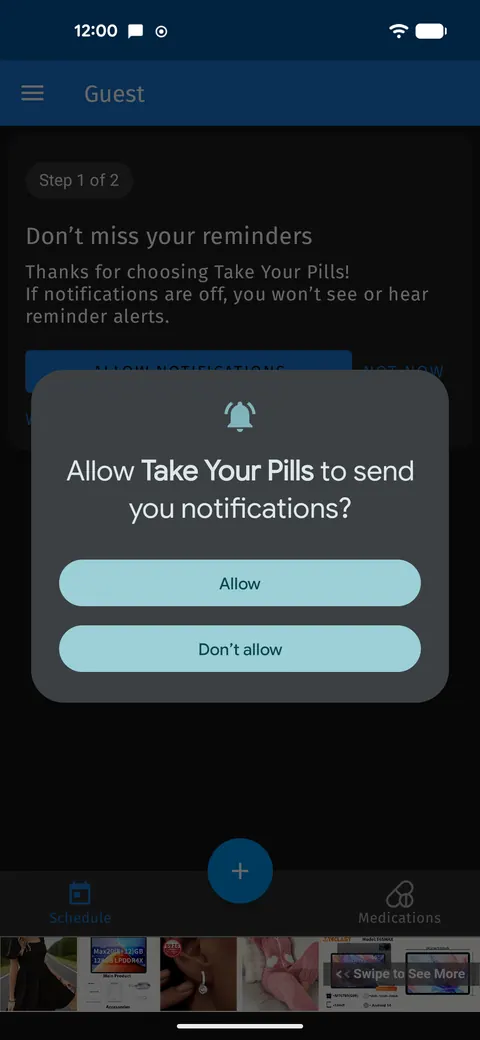
- A two-step setup: first allow notifications, then add a first medication to start receiving reminders, with a 10-second test option.
- How it makes money
- Third-party ads appear on History and Profiles screens; a 'Remove Ads' entry appears in the drawer, suggesting a paid ad-removal upgrade. No prices or paywall seen.
Screenshots
10 of 25 screens, captured on a real phone with sample data.
Home - today's schedule History - list view History - weekly chart view New medication form Settings - notifications and reminders Onboarding step 2 - add first medication Navigation drawer over home Medications - empty state Profiles - ad detail (app store) Notification permission dialog - +15 more screensFree with an account
Screenshots: © Dimitar Konstantinov Zhivkov, shown for commentary.
See all 25 screens — create a free accountSee every screen
The full map has all 25 screens, every feature and where each one lives. It is free with an account.
What could be better
Our read of the map, the store listing and recent reviews.
Make dose reminders fire reliably and show when they could notlarge
Reviews repeatedly report reminders that never fire or fire late, which the map flags as a medical-app risk. Ship a reminder pipeline that is tested on each Android version, and show the user a visible warning when alerts are blocked or the alarm failed.
Offer snooze and repeat reminders with a modal alert that stays until acted onmedium
Users miss doses when a reminder hides in the notification shade after a few seconds. Let users postpone by a chosen amount, repeat the alert until it is logged, and open a full alert screen instead of a transient banner.
Support flexible dose schedules: every-other-day, weekly, sub-hour intervals and per-time amountslarge
The current schedule model cannot express many real prescriptions. Let users set alternating days or weekly patterns, repeat intervals finer than whole hours, dose counts per time slot, and reminders relative to the last dose taken.
Set the profile name before any medication is addedsmall fix
New users add medications under a default Guest profile and cannot rename it cleanly. Ask for the person's name in onboarding before the first medication form, and make the profile name editable and used on every new medication.
Let users log a dose from the reminder and take several medications at oncemedium
Each medication fires its own notification and the phone must be unlocked to mark it taken. Group reminders into one notification with per-dose Taken actions, and add a Take All action for medications due at the same time.
Let each medication use its own alert mode: sound, vibration or silentmedium
Users cannot combine vibration with sound and the alert still sounds on mute. Offer per-medication choices for sound, vibration, or both, respect the phone's silent and vibrate modes, and keep custom ringtones after updates.
Remove ads from history and profiles and offer a clearly priced one-time upgradesmall fix
Ads on History and Profiles interrupt the core flow, and some users paid for ad-free and still saw ads. Show no ads on tracking screens for paid users, state the price and what it removes before purchase, and confirm the upgrade is active.
Want an app like this, but better?
Tell us the idea. We research it, and build it for you.
Submit your idea