
How Smule: Social Singing App works
Smule, Inc. · Music & Audio
Android
What it does
Karaoke social network where users sing songs solo or in duets and share recordings.
Who it is for: Karaoke fans who want to sing songs solo or in duets and share their recordings with other users.
Key features
Onboarding
Profile, genres, trial upsell, first song.
Social feed
Feed, explore, activity.
Settings and theme
Settings, dark theme.
Songbook
Song catalogue with Sing, VIP badges.
VIP trial
7-day trial upsell and VIP-locked recording types.
The main user flow
- Pick song, choose Solo/Duet/Group/Join, record
- Browse feed and explore
- Profile and settings
- Navigation
- Bottom bar: Feed, Explore, Songbook, Activity, Profile.
- Onboarding
- Google sign-in, profile name, genre picks, trial upsell, first song, permission prompts for mic, location, notifications.
- How it makes money
- Freemium with VIP subscription (7-day trial, $0.96/week); ads; VIP badges lock Solo, Duet, Group.
Screenshots
10 of 22 screens, captured on a real phone with sample data.
Songbook Feed 7-day free trial Select up to 4 genres Song recording type Welcome Microphone permission Cannot sing without microphone Explore Activity - +12 more screensFree with an account
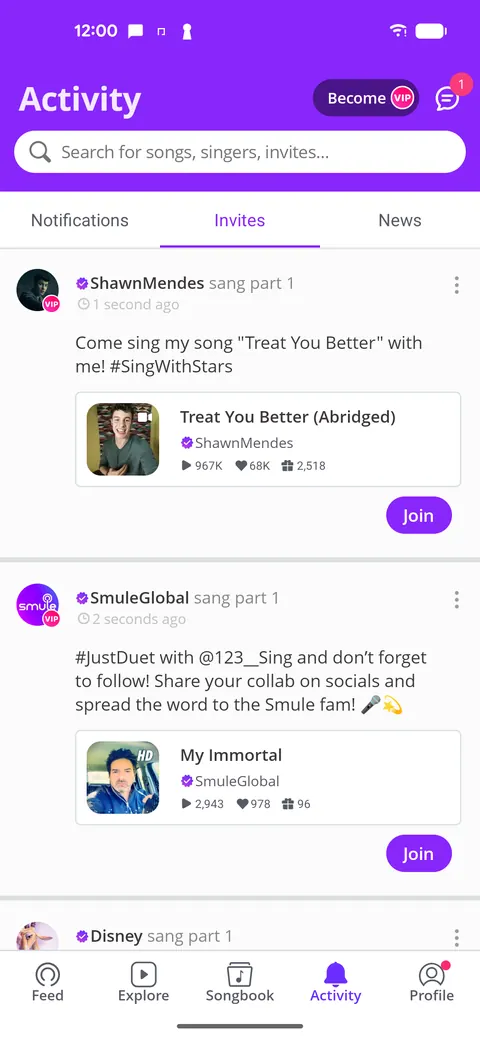
Screenshots: © Smule, Inc., shown for commentary.
See all 22 screens — create a free accountSee every screen
The full map has all 22 screens, every feature and where each one lives. It is free with an account.
What could be better
Our read of the map, the store listing and recent reviews.
Keep solo singing free and gate only extra recording typesmedium
Solo, Duet and Group are VIP-locked after the first song, so new users hit a paywall before real use. Keep solo recording free and sell premium songs or extras instead.
Save and upload recordings reliably, with visible retry and statusmedium
Reviews report recordings that fail to save or upload, with no clear state or retry path. Show queued and uploading status with retry, and keep the local copy until upload is confirmed.
Move the trial offer out of onboarding to after the first songsmall fix
The trial paywall appears right after genre picks, before the user has sung anything. Show the offer after a first completed recording instead.
Show the full recurring price and any renewal change before purchasesmall fix
Reviewers report sharp price rises on renewal and ask for the old rate back. Show the exact recurring price, renewal date and any change before purchase, and offer a lower tier.
Reconcile charges and credit purchases with a visible receipt trailmedium
Users report repeated charges and purchases that were paid but not credited. Keep a purchase log in the app and credit or refund any unfulfilled item automatically.
Ask for explicit opt-in before voice data is used for AI trainingsmall fix
Reviewers say voice recordings were enrolled in AI training by default. Make training off by default, ask in a separate consent step, and let users delete their voice data.
Stagger permission prompts and ask for the mic at point of usesmall fix
Mic, location and notification prompts appear back to back during onboarding, and denying the mic blocks singing. Ask each permission when it is needed, with a clear reason.
Keep recorded audio in sync when using Bluetooth or wired headphoneslarge
Reviewers say words drift off the song tempo over Bluetooth and noise appears with wired headphones. Add a latency calibration step and check the audio input route before recording.
Want an app like this, but better?
Tell us the idea. We research it, and build it for you.
Submit your idea