
How Tasks.org: to-do list & tasks works
Bradford Baker · Productivity
Android
What it does
Tasks.org is an open-source (GPLv3) to-do and task manager that works fully offline and optionally syncs with Google Tasks, Microsoft To Do, CalDAV/DAVx5/EteSync, or the paid Tasks.org Cloud. It covers dated and repeating tasks, subtasks, priorities, tags, lists, places (location reminders), filters, reminders, and theming.
Who it is for: People who want a to-do and task manager that works offline and can optionally sync with other task services.
Key features
Task management
Create, edit, complete, reschedule and delete tasks and subtasks; grouped list with undo.
Dates, repeats & reminders
Start/due dates with quick chips, repeat rules, and multiple reminders per task.
Filters, sort & search
Built-in and custom filters, grouping/sorting options, and full-text search.
Lists, tags & places
Organise tasks into local/synced lists, tags, and location-based places; priorities.
Settings
Extensive preferences: look and feel, notifications, task defaults, date & time, backups, widget, advanced, about.
Theming & customization
Light/dark/black/day-night themes, list/tag colors and icons; many colors and dynamic theme are paywalled.
The main user flow
- First launch > Continue without sync > empty My Tasks
- FAB > fill title/date/priority/tag/description/subtasks > Save > grouped list
- Tap task > edit fields + reminders > Save or Delete
- Complete a repeating task > auto-reschedule + undo snackbar
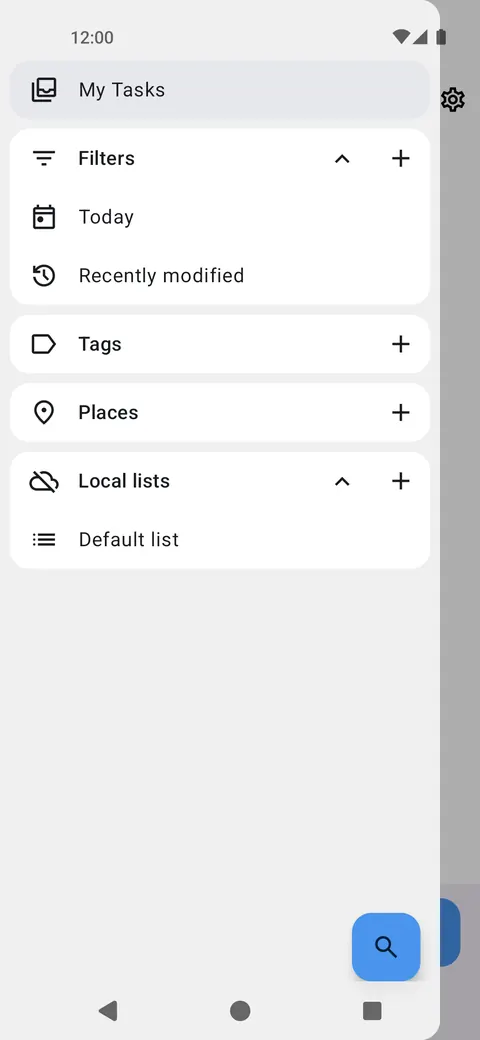
- Drawer > built-in/custom filters, tags, places, lists; create new ones
- Settings > look and feel (theme), notifications, backups, about
- Navigation
- A single task-list screen hosts a left navigation drawer (lists/filters/tags/places) and a bottom app bar (drawer, search, sort, voice, overflow) with a FAB. The task editor, pickers and settings open as full screens or bottom sheets; long-press enters a multi-select contextual action bar.
- Onboarding
- Minimal: one screen offering Add account, Continue without sync, or Import backup. No tutorial; the app is immediately usable offline.
- How it makes money
- Freemium. Free tier includes all local task management and sync with Google Tasks / Microsoft To Do / CalDAV / DAVx5 / EteSync. The Tasks.org Cloud subscription ($35.99/year or $3.59/month, 7-day trial) adds Cloud sync, Friends & Family sharing, email-to-task, and the desktop app; the Dynamic (Material You) theme and most accent colors are also subscription-gated. DAVx5/CalDAV/EteSync are offered on a 'name your price' basis.
Screenshots
10 of 40 screens, captured on a real phone with sample data.
Repeating task rescheduled + undo Existing task editor New task — filled editor Search results Tag filtered list Tasks.org Cloud — annual plan Tag settings First launch — sync chooser List overflow menu Navigation drawer - +30 more screensFree with an account
Screenshots: © Bradford Baker, shown for commentary.
See all 40 screens — create a free accountSee every screen
The full map has all 40 screens, every feature and where each one lives. It is free with an account.
What could be better
Our read of the map, the store listing and recent reviews.
Recognise paid subscriptions on every install and sync pathmedium
Reviews say paid users are shown as unsubscribed after updates or reinstalls, so sync stays locked. Verify entitlement on each launch, restore it on reinstall, and show the account in use before purchase.
Let repeating tasks be completed and show their upcoming occurrencesmedium
Completing a repeat only reschedules it, and later dates are hidden, so users cannot mark it done or see the future. Add a Mark done action that logs each occurrence, and list the next several due dates.
Keep manual drag order and subtask order across saves and syncsmedium
Users set an order and it flips or resets after saving, syncing or a sort change. Store manual position as its own field and keep it through edits and sorts, with a single toggle for alphabetical order.
Show completed tasks in the default view with one visible togglesmall fix
Users cannot find completed tasks, so they think the feature is missing. Show a visible completed count with a one-tap toggle in the list header, not buried in the sort sheet.
Re-arm place reminders on every visit and show GPS statusmedium
Place reminders fire once, then stop, or fire regardless of location. Re-arm each place on every entry and show whether location is active so users can see why a reminder did not fire.
Back up automatically before each sync and warn when no backup existsmedium
Sync errors have wiped task contents, and local lists are deleted on uninstall. Take an automatic backup before each sync, and show a warning when no backup exists or the last one is old.
Make the home-screen widget keep its list through lock and rebootmedium
Widgets vanish when the phone locks or reset to the default list, and some fail to set up. Keep the chosen list bound to the widget, restore it after lock, and show a clear error when setup fails.
Show one reminder-permission check with a direct fix, not a persistent nagsmall fix
Users are told reminders lack permission and the warning persists until they grant it. Show a single check with a button to the exact system setting, and dismiss it once granted.
Want an app like this, but better?
Tell us the idea. We research it, and build it for you.
Submit your idea