
How VSCO: Photo & Video Editor works
Visual Supply Company · Photography
Android
What it does
VSCO is a photo and video editor with presets, a community feed and a studio library for saving edits.
Who it is for: People who want to edit photos and videos on their phone, share work in a community feed, and save edits in a studio library.
Key features
Feed and discover
Discover community photos and the Feed tab.
Sign-up and permissions
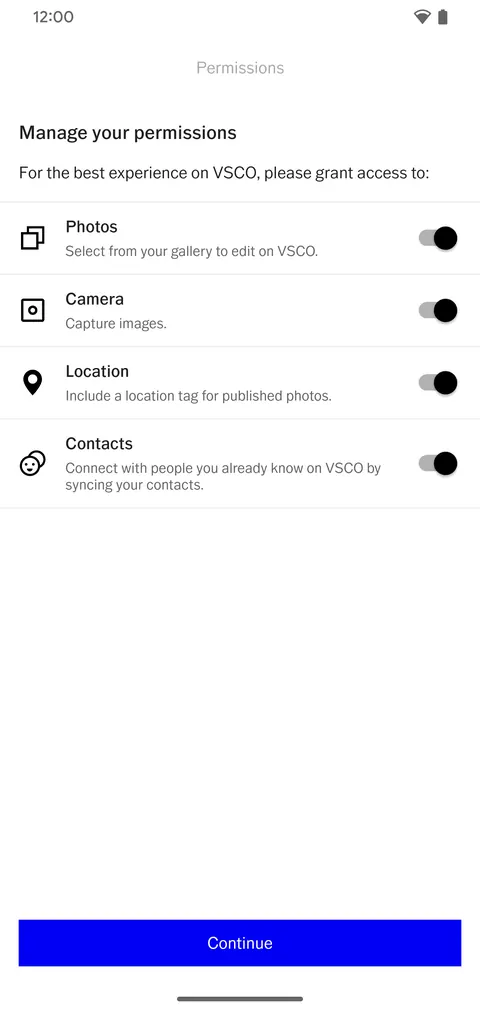
Create-account path with Google, profile name and birthday, the permissions primer (photos, camera, location, contacts).
Studio and editing
Studio library with filter chips, Take a photo and Import actions.
VSCO membership
Membership paywall with yearly and monthly plans and a 7-day trial; shown and closed.
The main user flow
- Create a free account (Google), set a profile name and birthday
- Decline the permissions primer and land in Studio
- Browse Discover and the Feed
- Open the membership offer (shown and closed)
- Navigation
- Bottom bar: Studio, Feed, Discover, Spaces, Profile; the studio has filter chips and Take a photo / Import.
- Onboarding
- Google account, profile name and birthday, then a permissions primer that asks for photos, camera, location and contacts before the app opens.
- How it makes money
- Freemium: VSCO membership with a 7-day trial on a yearly plan (about $19.99 per year) or monthly ($7.99). Nothing was purchased.
Screenshots
5 of 6 screens, captured on a real phone with sample data.
Studio (home) Discover Elevate your creative process (paywall) Welcome Permissions primer - +1 more screenFree with an account
Screenshots: © Visual Supply Company, shown for commentary.
See all 6 screens — create a free accountSee every screen
The full map has all 6 screens, every feature and where each one lives. It is free with an account.
What could be better
Our read of the map, the store listing and recent reviews.
Show the membership paywall after a first save, not right after sign-upsmall fix
The paywall appears straight after sign-up, before the user has used the app. Show the offer after a completed first edit or save, with a clear close option that keeps the free tools usable.
Fix sign-in retries and replace generic connection errors with clear recoverymedium
Sign-up with a taken Google name returned Unexpected API error, and login fails with connection messages. Retry sign-in on transient failures and tell users what to do next.
Default location and contacts to off and ask for each permission in contextsmall fix
The permissions primer switches location and contacts on by default before the app opens. Leave them off and request each permission when the feature that needs it is first used.
Show renewal date and price on the plan card and remind users before the trial endssmall fix
Users report unexpected charges after a free trial and automatic yearly renewals. Show the renewal date, price and cancel path on the plan screen, then send a reminder before conversion.
Reach Android parity for RAW, filters and editing toolslarge
Reviewers say Android lacks RAW editing and some filters and effects that iOS has. Ship the same editing tool set on Android, or state the gaps in the store listing before install.
Verify exports before saving and report failures with a retrymedium
Exported photos show as black or corrupted, and edited videos fail to save. Check each export's output and show a clear error with retry, rather than silently writing a bad file.
Fix launch crashes and slow photo capture before adding new featuresmedium
Users report crashes on open and slow capture, and say updates did not fix it. Set a crash-free launch and capture-time target and gate releases on it.
Want an app like this, but better?
Tell us the idea. We research it, and build it for you.
Submit your idea