How YouTube Studio works
Google LLC · Video Players & Editors
Android
What it does
Creator companion app: monitor channel analytics, manage uploads, read and reply to comments, and track YouTube Partner Programme progress.
Who it is for: Creators who manage their YouTube channel, uploads, comments, analytics, and Partner Programme progress.
Key features
Analytics
Overview, content, audience and trends tabs with charts and realtime.
Welcome carousel
Three-page intro.
Content management
List uploads, sort and search.
Earn / partner programme
Eligibility and earning journey.
Channel dashboard
Snapshot of channel subscribers, views and watch time.
Community
Comments and posts tools.
The main user flow
- Choose account and see dashboard
- Check analytics
- Manage content list
- Review earn eligibility
- Navigation
- Five bottom tabs: Dashboard, Content, Analytics, Community, Earn; top bar with create, search, bell and account.
- Onboarding
- Notification permission, account chooser, three-page welcome carousel.
- How it makes money
- Free; the app is the on-ramp to the Partner Programme (memberships, Supers, ads revenue).
Screenshots
10 of 16 screens, captured on a real phone with sample data.
Dashboard Analytics overview Account Welcome Community tab with intro sheet Notifications Notification permission Account chooser Earn Analytics (scrolled) - +6 more screensFree with an account
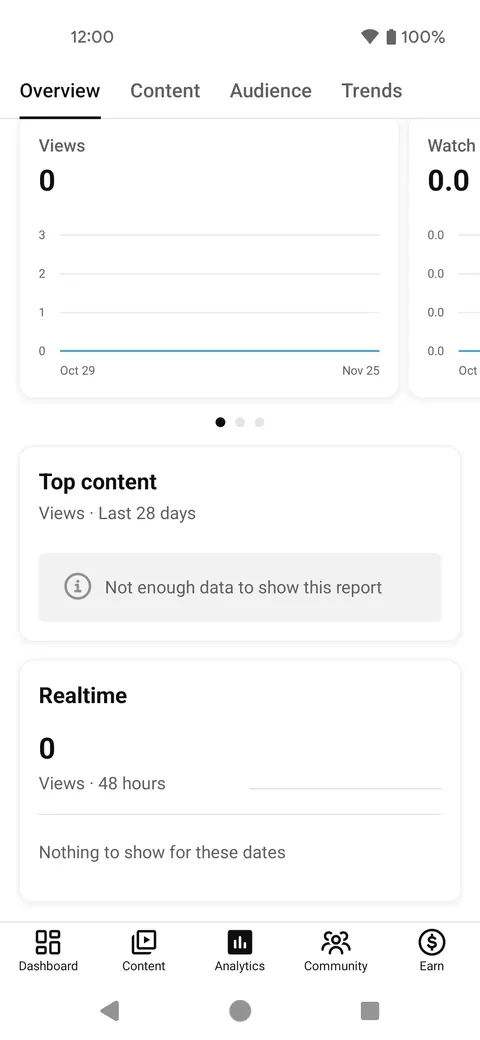
Screenshots: © Google LLC, shown for commentary.
See all 16 screens — create a free accountSee every screen
The full map has all 16 screens, every feature and where each one lives. It is free with an account.
What could be better
Our read of the map, the store listing and recent reviews.
Label analytics counts with their freshness and stop them changing on reopenmedium
Reviews say counts drop or stall between opens and that data looks wrong. Show a last-updated time on each count, keep the figure stable until the next sync, and flag when a value is still pending.
Let creators change thumbnails for uploads and Shorts from the content listmedium
Creators cannot edit thumbnails in the app, and Shorts thumbnails are not reachable. Add a thumbnail action on each content row and a Shorts-specific thumbnail picker, reusing the existing list and detail flow.
Defer notification permission until the user has seen real channel datasmall fix
The app asks for notification permission before showing any value, and it adds intro sheets before data. Show the dashboard first, then ask for notifications in context, for example after the first new comment.
Give new channels a useful empty dashboard with clear next stepssmall fix
An empty channel shows little to see, so new users have no reason to return. Replace the blank cards with a checklist of setup steps and the first milestone to reach, shown on the dashboard and Earn tab.
Show a per-requirement breakdown of Partner Programme eligibility and why apply is blockedmedium
Creators report the apply button cannot be used and earnings or watch time look wrong. Show each eligibility requirement with its current value, the date counted from, and a plain reason when apply is unavailable.
Add scheduled live events and core desktop tools to the mobile applarge
Reviewers say the mobile app lacks core functions available on desktop, such as scheduled live events. Prioritise scheduling and the most-used desktop actions so mobile is not a reduced copy of the web version.
Show per-post impressions for community posts, not only combined totalsmedium
Creators want impressions for individual community posts, but the analytics view combines them. Add a per-post impressions column in the Community tab with the same metric definitions used for videos.
Want an app like this, but better?
Tell us the idea. We research it, and build it for you.
Submit your idea